Guide5 min read
Bibliography management, inside your essay.
Most students keep their sources in one app, write in another, and fix the reference list by hand the night before. In EssayKraft the references live in the essay, so the bibliography writes itself.
 Noah PageMaker of EssayKraft. This guide covers EssayKraft 2.2 on Mac and iPad.
The short answer
To manage a bibliography in EssayKraft, add each source to the document’s References panel. You can search by title, author, DOI or ISBN, paste a link, or import a BibTeX or RIS file from Zotero, Mendeley or EndNote. Cite sources as you write with Insert Citation (⌘K on Mac), and EssayKraft builds the bibliography at the end of the document.
There are sixteen citation styles. Switch styles and every citation and every entry is reformatted.
Why keep references in the essay
A citation generator gives you a formatted string to paste. It doesn’t know your essay exists. Change from APA to Harvard, or find out a source’s year was wrong, and you have to fix every citation and every entry by hand.
When the references live in the document, a citation is a link to a source, not a piece of text. Fix the source once and every citation that points to it updates. The reference list is built from your sources, in the style the document uses, so nothing on it is left in the wrong format.
Pick a citation style
Each document has its own citation style, and you can change it whenever you like, even the night before the deadline. EssayKraft includes sixteen:
- APA (7th edition)
- APA (6th edition)
- MLA
- Chicago author-date
- Chicago author-date (17th edition)
- Harvard (Cite Them Right)
- Elsevier Harvard
- SAGE Harvard
- Turabian author-date
- ASA
- APSA
- IEEE
- ACM
- CSE
- Vancouver
- Springer Basic
The styles are rendered from the same CSL style definitions that Zotero and Mendeley use, so the output follows the published style guides. One limit to know about: Chicago and Turabian are the author-date versions. If your course wants notes and bibliography, with full citations in footnotes, check with your tutor before you rely on author-date.
Add your sources
Open the References panel from the toolbar and press +. There are three ways in.
Search for it
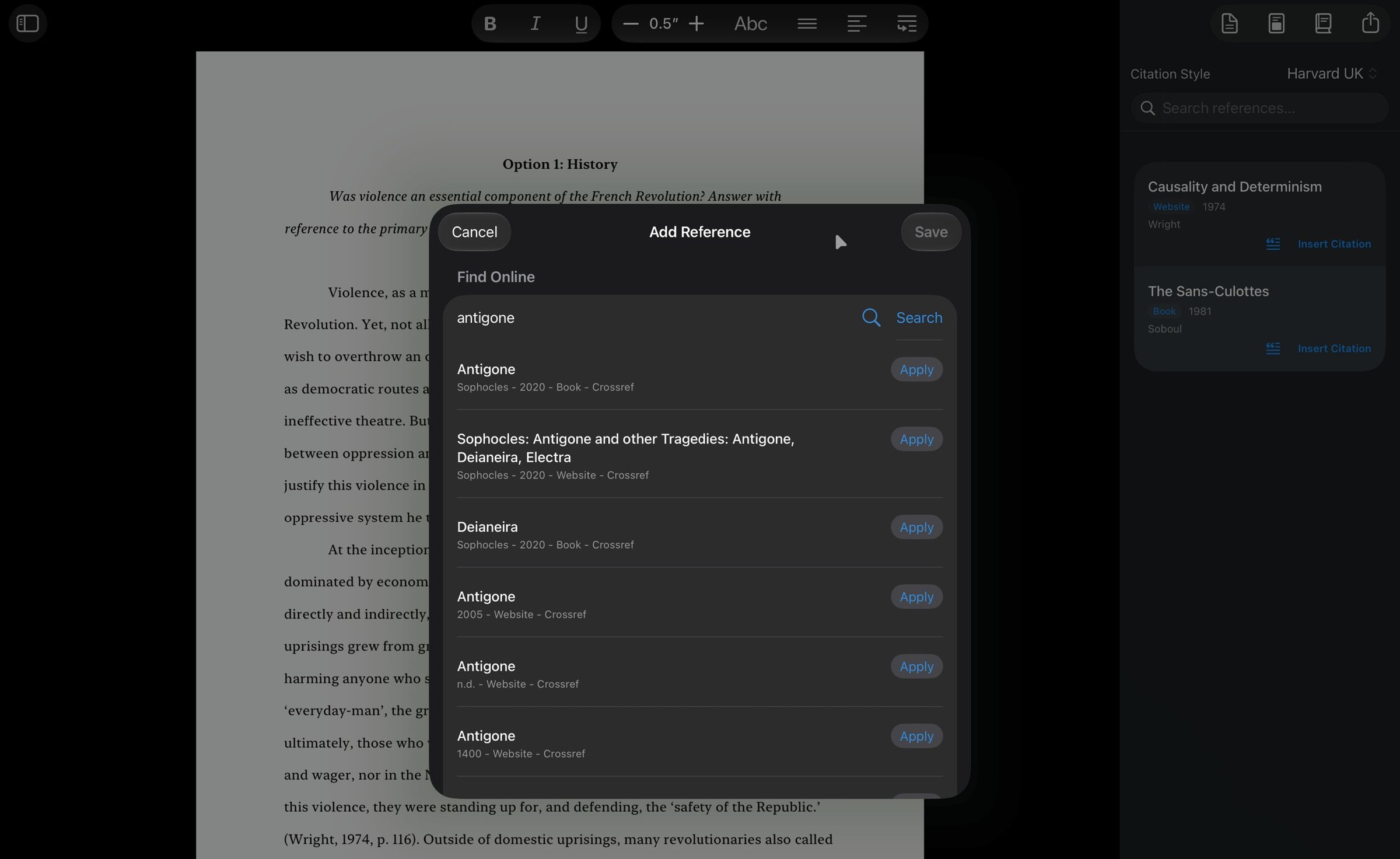
Choose Search for Reference and type a title or an author, or paste a DOI or ISBN. Journal articles come from Crossref and books come from Open Library, and the result fills in the authors, year, journal, volume, issue, pages and publisher for you. This is the only part of EssayKraft that uses the internet.
Paste a link
Paste a web address and it becomes a reference, ready for you to check and save.
Type it in
For anything a search can’t find, add it by hand. Choose a type (book, book chapter, journal article, website, conference paper, thesis or report) and EssayKraft shows the fields that type needs. Those include authors and editors, the journal or book it sits in, volume, issue, page range, edition, place of publication, ISBN, ISSN, DOI, URL and the date you accessed it.
Bring your library from Zotero, Mendeley or EndNote
If you already keep your sources in a reference manager, you don’t need to retype them.
- In Zotero, select the items or the collection for this essay and export them as BibTeX or RIS. Mendeley and EndNote export the same formats, and so do most journal websites.
- In EssayKraft, open the References panel, press +, and choose Import from File.
- Pick the .bib or .ris file. EssayKraft tells you how many references it imported, and how many entries it couldn’t read, if any.
No account and no sign-in are involved, and nothing leaves your device.
Cite as you write
Put the cursor where the citation belongs and choose Format ▸ Insert Citation, or press ⌘K. Pick the source and add a page number if you’re quoting. The citation appears in the style the document uses, for example (Hobsbawm, 1962, p. 74) in APA.
Click or tap a citation to edit it. You can give citations their own label colours, which makes it easy to see at a glance which source carries which part of the argument.
The bibliography writes itself
The bibliography sits at the end of the document and updates as you work. Add a source and it appears in the list. Correct a source and the entry changes. Change the style and the whole list is reformatted, with the right order, punctuation and italics for that style.
When you export the essay as PDF, Word (.docx) or RTF, the bibliography goes with it.
Take your references with you
References aren’t locked in. Export a document’s references as BibTeX or RIS from File ▸ Export on Mac, or the Export button on iPad. Then open them in Zotero or any other reference manager.
Tips for a clean reference list
- Search by DOI or ISBN when you have one. It’s the most reliable way to get the right edition with complete details.
- Check each entry after a lookup. Online records are sometimes wrong, especially title capitalisation and missing page ranges. A quick look before you cite saves fixing it later.
- Keep long-term libraries in a reference manager. In EssayKraft, references belong to each document. If you collect sources over a whole degree, keep the master library in Zotero and import what each essay needs.
- Set the style first. You can change it at any time, but writing in the right style shows you what the finished page will look like.
Coming from another essay app? See how EssayKraft compares with Essayist.